
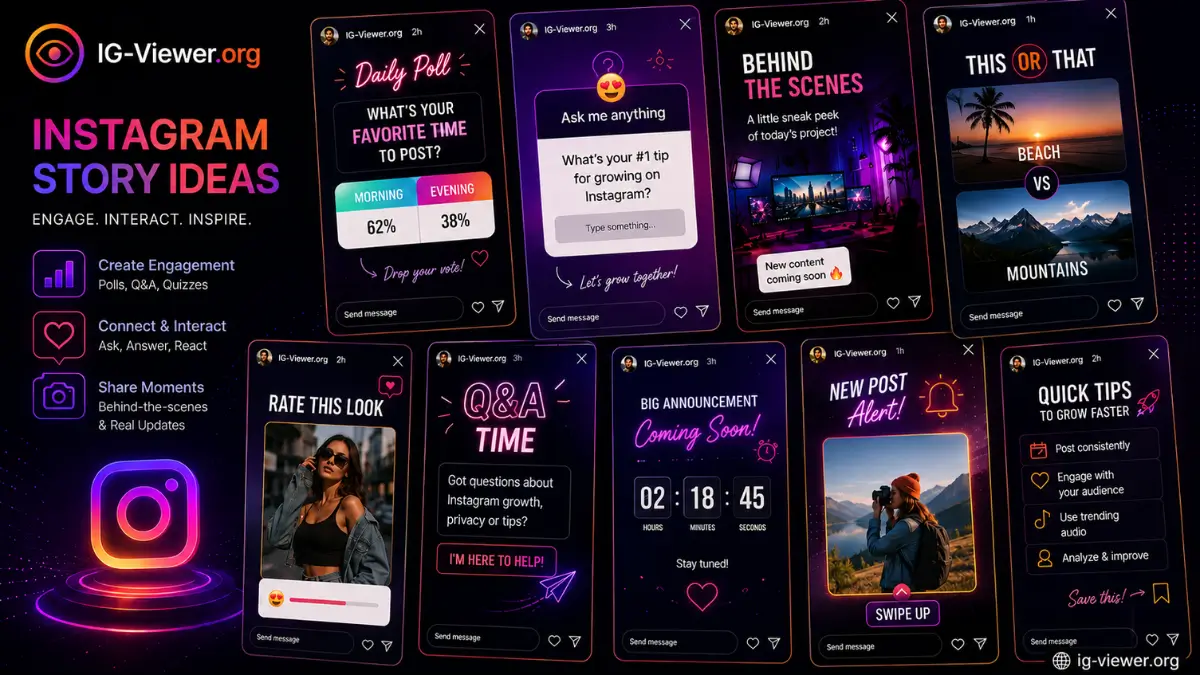
This list of instagram story ideas is organized by the specific engagement goal each format serves — polls and quizzes for deep engagement, behind-the-scenes content for authenticity, and sales prompts for conversion — so you can pick based on what your account actually needs this week, not just grab a random idea off a list.
Competition for attention on social media has never been fiercer. In 2026, algorithmic Reels and sponsored content dominate most feeds, making organic reach on the main grid increasingly difficult to earn. The 24-hour Story feature remains one of the few spaces left for raw, low-production, authentic connection with an audience that’s actively chosen to check in on you.
If your engagement has flatlined and you’re staring at a blank recording screen, this is a strategy injection: over 100 categorized instagram story ideas built to widen your funnel, trigger algorithmic engagement, and turn casual scrollers into people who actually look forward to your stories.
Why story engagement matters more than ever
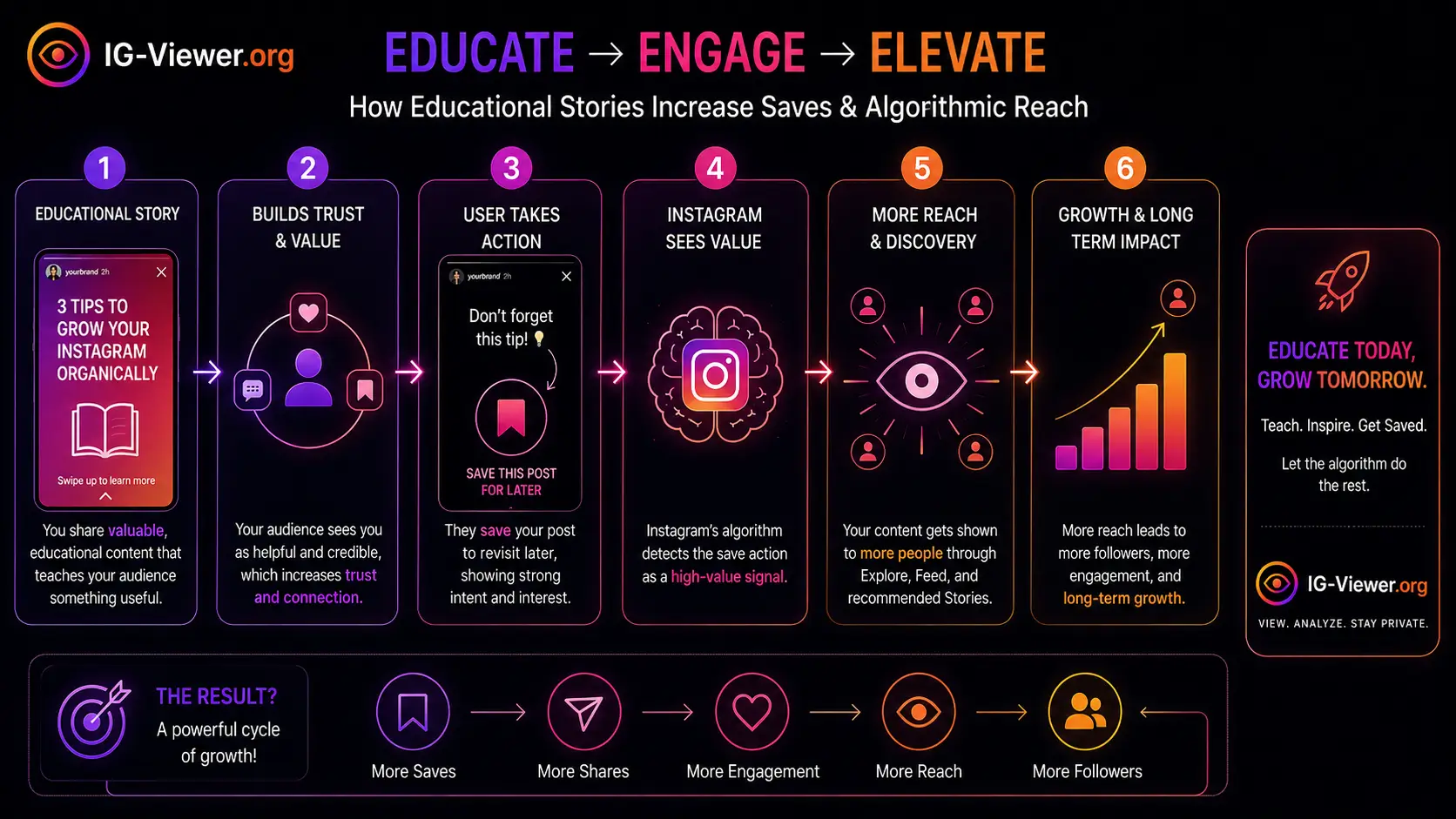
Before the list, it’s worth understanding why the specific action you’re prompting matters, since not all engagement counts equally. Instagram’s ranking treats Stories differently from grid posts — when someone replies to a poll, taps an emoji slider, or holds their thumb down to read a long text block, that registers as “deep engagement,” a stronger signal than a passive view. The higher your deep-engagement rate, the closer to the front of the story queue your profile ring tends to appear for that person the next time you post. For the fuller mechanics of how that ranking actually works, see our guide on how the Instagram algorithm works.
Before diving into new formats, it’s also worth understanding your current baseline — checking how a public account (a competitor, or even your own alt view) is currently using stories can inform what’s already working in your specific niche. Our anonymous story viewer lets you check a public account’s current stories without logging in or alerting them you’re looking, which is a genuinely useful research step before committing to a content direction.
Now, the ideas — organized by the specific goal each one serves.
Category 1: The Engagement Triggers (Polls, Quizzes & Sliders)
Goal: get the user to physically tap the screen. Every tap tells the algorithm they care about your content.
- The "This or That" Poll: Show two outfits, two products, or two logos and ask them to vote.
- The Controversial Food Take: "Pineapple on pizza: yes or jail?" — divisive, low-stakes questions drive outsized poll engagement.
- The Pop Quiz: Test their knowledge about your brand or industry with the Quiz sticker.
- The "Guess Where I Am" Game: Post a heavily zoomed-in or blurry location photo.
- The Emoji Slider Rating: Ask followers to rate a new song, movie, or product design.
- The AMA: Use the Question sticker — "Just hit 10k! Ask me anything about the journey."
- The Reverse AMA: Ask them what their biggest struggle in your niche is right now.
- The "Help Me Choose" Poll: Two book covers, two menu items — let the audience decide.
- Trivia Tuesday: Make it a weekly recurring quiz segment. Consistency builds habit.
- Spot the Difference: Two nearly identical photos, one edited detail to find.
- Fill-in-the-Blank: "The best productivity hack is ____." Use the Question sticker.
- Unpopular Opinion Drop: State a hot take, then poll "agree or disagree?"
- Morning Mood Check: A two-emoji poll (☕ or 😴) early in the day.
- Product Feature Vote: Ask which feature to build next, if you're a brand.
- The Outfit Check: Let them vote before an important meeting or event.
- "Caption This" Contest: A funny photo, best reply gets a shoutout.
- Goal Tracking Slider: Share a personal goal and use the slider to show live progress.
- Podcast Guest Tease: Blur your next guest's face, use the Question box for guesses.
- "What Would You Do?" Scenario: Pose a dilemma, ask for reactions via DM.
- "Rate My Setup" Slider: Your workspace, gym, or gaming setup.
Category 2: Behind-The-Scenes (Authenticity Builders)
Goal: humanize your brand. People connect with people, not logos.
- The Morning Routine: The unglamorous reality of how you start your day.
- The Workspace Tour: A messy desk reads as more relatable than a sterile one.
- "Day in the Life" Timelapse: Tripod + hyper-lapse of 30 minutes of deep work.
- The Coffee Run: A simple, aesthetic shot of your local cafe.
- Team Introduction: Spotlight an employee who usually stays off-camera.
- The Brainstorming Whiteboard: Show the messy, chaotic idea-generation process.
- The Shipping/Packaging Process: Satisfying, ASMR-style order-packing footage.
- The Blooper Reel: Outtakes from your last polished Reel or video.
- The Pet Cameo: When all else fails, the internet runs on pets.
- The Tech Stack: The specific apps, cameras, or software behind your work.
- The Unboxing: New gear or a PR package, unboxed raw on camera.
- "Expectation vs. Reality": The polished grid post next to the messy shoot.
- The Lunch Break: A quick snapshot of what you're eating.
- Commute Thoughts: A direct-to-camera walk-and-talk, sharing a random thought.
- The Evening Wind Down: How you disconnect at the end of the day.
- "Before the Makeover": The raw space or product before the polish.
- Soundtrack of the Day: Share the album powering your current workflow.
- The "Sneak Peek": Show just a corner of an upcoming launch.
- The Frustration Vent: A minor, relatable annoyance to build camaraderie.
- The Desktop Screen Grab: The chaos of your 40 open browser tabs.
Category 3: Value and Education (Authority Builders)
Goal: position yourself as the go-to expert in your niche.
- The Micro-Lesson: Teach one specific skill in 15 seconds.
- The Tool Recommendation: A website or app that saves you real time.
- The Book Review: One takeaway from whatever you just finished reading.
- "A Mistake I Made": Vulnerability builds trust — share a failure and the lesson.
- Industry News Update: Be first to break something relevant to your niche.
- "Hack of the Week": A little-known shortcut worth sharing.
- The FAQ Answer: Take a DM question you get constantly, answer it publicly.
- The Myth Buster: Take a common misconception and dismantle it.
- The Step-by-Step Tutorial: Multiple slides — prep, action, result.
- "Do's and Don'ts": A simple side-by-side text graphic.
- Case Study Teaser: A client win, with a link to the full write-up.
- Podcast Highlight: An audiogram of your best quote.
- "Save This For Later": A checklist graphic worth screenshotting.
- "Why It Works" Breakdown: Respectfully analyze a competitor's successful campaign.
- Resource Roundup: Three links you found genuinely valuable this week.
- "Before You Buy" Checklist: What to look for in your industry.
- The Historical Fact: The origin story of your brand or industry.
- The Vocabulary Lesson: Define confusing jargon in plain English.
- "Day in History": A throwback to a major brand milestone.
- The Quote Graphic: A well-designed quote from an industry leader.
Category 4: Community and User-Generated Content
Goal: make followers feel seen. Turn consumers into advocates.
- The Customer Spotlight: Repost a customer actually using your product.
- Follower Q&A Feature: Answer a follower's question and tag them (with permission).
- The "Add Yours" Sticker: Start a chain — "show me your current view."
- Testimonial Screenshot: Blur the name, share a glowing DM.
- Community Milestone: Celebrate 5k, 10k, or 50k followers directly.
- "Caption Contest Winner": Highlight yesterday's best response.
- Charity Highlight: A cause your brand supports, with a donation nudge.
- "Tag a Friend" Prompt: A relatable meme, ask who it reminds them of.
- Local Business Shoutout: Promote another creator or small business nearby.
- "Where Is Everyone From?": Location sticker + question box to map your audience.
- The Weekly Recap: Top three community highlights from the week.
- "Who Should I Interview Next?": Let the community pick your content pipeline.
- Fan Art Repost: Feature anything created about you or your brand.
- "What Are You Reading?": Ask for recommendations.
- Challenge Check-In: Mid-challenge community pulse check.
Category 5: Sales and Promotions (Conversion Drivers)
Goal: move users off the app and toward a purchase or signup.
- Flash Sale Countdown: Countdown sticker for a 24-hour promo code.
- "Link in Bio" Teaser: Show the result, make them click to see how you got there.
- Restock Alert: Urgent update when a popular item returns.
- Product Walkthrough: A 60-second direct-to-camera pitch.
- The Link-Sticker Lead Magnet: A free PDF/template in exchange for an email signup.
- Early Access Tease: Give your Close Friends list the link two hours early.
- Abandoned Cart Nudge: "Still thinking about it? Free shipping for 3 hours."
- Live Stream Announcement: Tell them exactly when so they can set a reminder.
- "Last Chance" Warning: "Only 5 spots left."
- Service Breakdown: Clearly explain what you offer and who it's for.
- Pricing Transparency: Your exact pricing and why it costs what it does — builds trust.
- "Hire Me" Portfolio: A quick, three-slide showcase of your best work.
- Affiliate Product Review: A genuine review with your affiliate link.
- Event Registration: Link sticker driving signups for an upcoming webinar.
- Gift Guide: A curated product list for the season.
Category 6: The "Tap to Reveal" & Aesthetic Formatting
Goal: use visual formatting to stop the thumb from swiping to the next creator.
- "Tap and Hold": A long, heartfelt micro-blog. Tell them to hold to read — great for retention time.
- "Tap to Clean": A messy room, then the clean one. Satisfying contrast.
- The Hidden Link: Tuck the Link sticker inside a graphic to gamify finding it.
- Color Palette Drop: Share the hex codes from your latest shoot.
- Wallpaper Giveaway: A phone-formatted graphic, tell them to screenshot it.
- The Blank Template: A bingo card or checklist to screenshot, fill, and tag you in.
- "Turn Your Sound On": If audio is the punchline, flag it so nobody misses it on mute.
- Stop-Motion Animation: Ten sequential photos of a product moving slightly.
- The Silhouette Tease: A darkened photo announcing a mystery guest or product.
- "Screenshot Roulette": A fast GIF of prizes or quotes — screenshot to see what you get.
- The Sign-Off: A consistent, branded final slide thanking them for watching.
How to actually pick, when you're stuck
With 101 options, analysis paralysis is a real risk on its own. A simple rule that avoids it: rotate through the six categories deliberately rather than picking randomly. Over a given week, aim for at least one engagement trigger (category 1), one behind-the-scenes moment (category 2), and one piece of value content (category 3) — categories 4 through 6 slot in opportunistically around community moments, launches, or whenever a “tap to reveal” format genuinely fits what you’re sharing. This rotation alone solves most of the “what do I even post today” freeze without needing a rigid content calendar.
If you’re a brand-new account, weight your mix toward categories 2 and 3 — behind-the-scenes and educational content don’t require an existing relationship with your audience to land, since they earn attention on their own merits rather than relying on people already caring about you specifically. Engagement triggers (category 1) work best once you have at least a small base actively watching, since a poll with three votes doesn’t generate the same momentum as one with three hundred.
If you’re an established account seeing a recent engagement dip, category 1 is usually the fastest lever to pull — interactive formats produce an immediate, measurable deep-engagement signal that can help reset a sluggish stretch faster than passive content will, simply because the algorithm can see the response within minutes rather than needing to infer interest from watch time alone.
If you’re actively selling something, resist the urge to lead every week with category 5. Sales-heavy story sequences that aren’t balanced against value or authenticity content tend to see follower fatigue set in faster than the short-term conversion bump is worth — the accounts that sustain conversion over time are usually the ones that have earned trust through the other five categories first.
Conclusion
Having 100+ instagram story ideas is only useful if analysis paralysis doesn’t cancel out the benefit. In 2026, the algorithm consistently rewards creators who show up regularly over creators chasing individual viral moments — you don’t need professional lighting or a cinema camera to post something genuinely engaging. You need a clear goal for the specific story, and the willingness to test different formats until you find what your specific audience responds to.
Bookmark this page. Next time you open the app and freeze, pick a number between 1 and 101, and just hit record.
Frequently Asked Questions
Straight answers about how the tool works, what it can and can’t do, and how to use it safely.
How many stories should I post per day?
There's no universal number — what matters more than frequency is that each story earns genuine interaction. A handful of stories that people actually tap through and engage with outperforms a high-volume dump of low-effort slides.
Do polls and quizzes actually help my reach, or just engagement?
Both. Deep engagement actions like poll votes and quiz answers feed directly into the same ranking signals that influence how prominently your future content gets shown, so interactive formats have a real reach benefit, not just a vanity-metric one.
Should I repeat story ideas, or does that get stale?
Recurring formats (a weekly trivia segment, a regular Q&A slot) actually build habit and anticipation among your audience when spaced sensibly — the goal is a sustainable rotation, not never repeating an idea.
What's the single best story idea for a brand-new account?
Behind-the-scenes content tends to perform best for new accounts specifically, since it doesn't require an existing audience relationship to feel genuine — it works on its own merits by being inherently more relatable than a polished product shot.
How do I know which of these ideas is actually working for my account?
Check your native Story Insights (for business/creator accounts) after trying a handful of ideas from different categories, and track which categories consistently outperform your account's average — the right mix is specific to your audience and won't be identical to anyone else's.